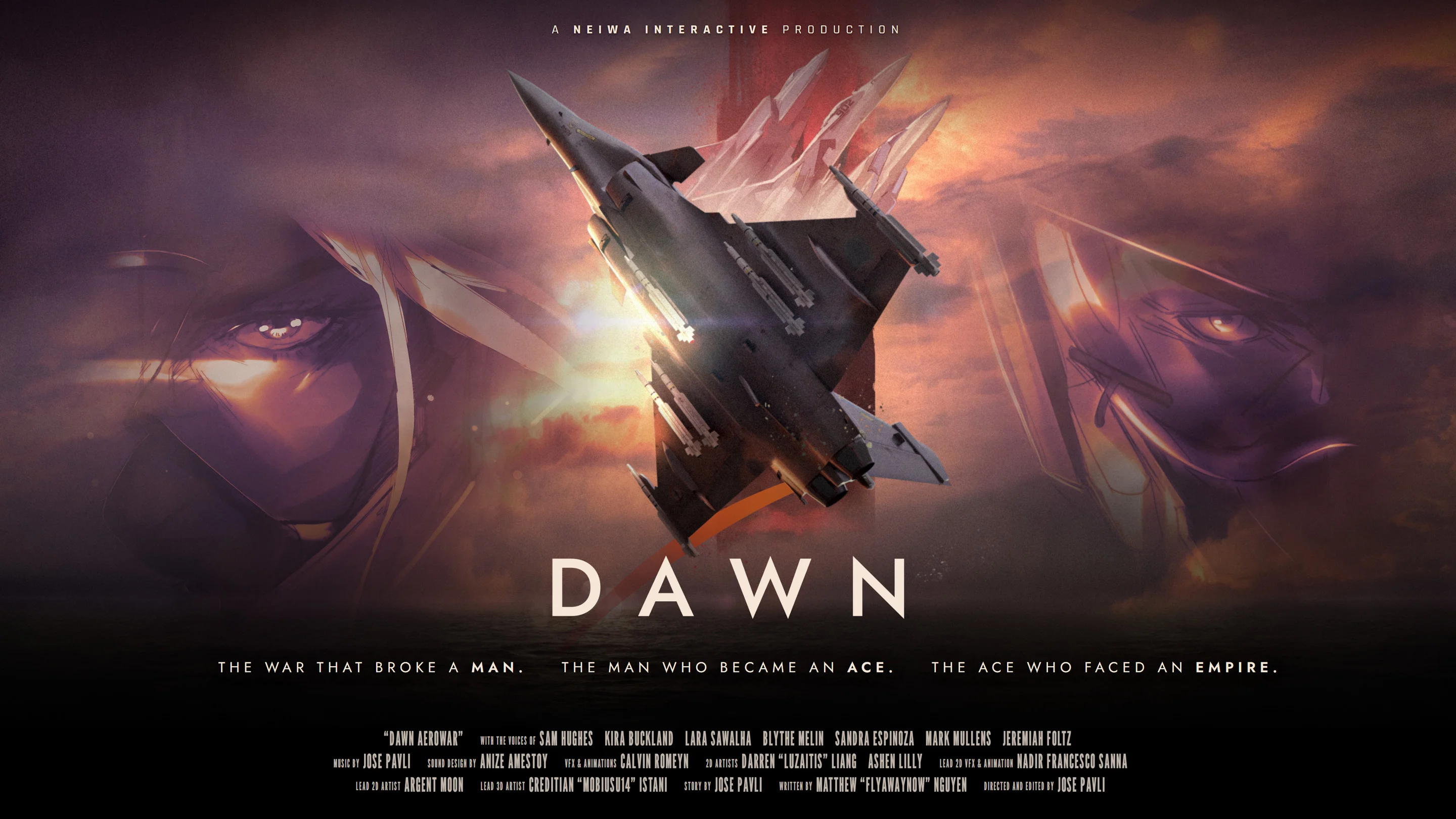
- Dawn Aerowar chapter guide: Follow the 12-episode story in its intended cinematic order.
- Story route: Track Zodiac 1 from the Northern Front through the Strait, Aegis Sea, and capital.
- Viewing mode: Use Cinematic mode for the most direct film-style presentation.
- Chapter selection: Use the map to revisit available episodes without treating it like a combat mission screen.
- Runtime: Plan for nearly two hours across the full animated war story.
Dawn Aerowar Chapter Guide: How the Route Works
Dawn Aerowar chapter guide planning is built around story navigation rather than traditional flight-game progression. The project is presented as an interactive animated war story with 12 episodes, full voice acting, 3D aircraft animation, and 2D character artwork. The main experience follows Zodiac 1 during a decisive final mission near the end of a major conflict.
The chapter structure is designed to help viewers move through a cinematic route. Instead of focusing on aircraft upgrades, combat statistics, or equipment choices, use the episode map and viewing controls to follow the narrative from one major theater to the next.
Video Highlights:
- The story centers on Zodiac 1 and a final wartime operation.
- The visual presentation combines 3D aerial sequences with 2D character art.
- The route moves through several named regions before reaching the capital.
- Interactive features support episode selection and story revisits.
Northern Front
The opening theater establishes the wartime situation and places Zodiac 1 inside the central mission.
The Strait
The route expands into a narrower strategic passage where the operation continues beyond the opening front.
Aegis Sea
The sea crossing broadens the scale of the mission and connects the front-line action with the wider conflict.
The Capital
The final regional stage brings the mission toward its concluding narrative movement.
| Guide Element | What It Means | Recommended Approach |
|---|---|---|
| Episodes | The complete story is divided into 12 parts | Watch in listed order during a first viewing |
| Runtime | The full work lasts nearly two hours | Reserve one uninterrupted viewing session |
| Map | A navigation interface for story chapters | Use it to select or revisit episodes |
| Cinematic mode | A presentation focused on film-like viewing | Choose it when prioritizing atmosphere and narrative |
| Mission route | The broad movement of the story | Remember the regional sequence rather than inventing episode titles |
Treat the chapter map as a story index. It organizes the animated feature and does not indicate a conventional progression system with levels, loot, or aircraft builds.
Step-by-Step Chapter Viewing Route
The most reliable way to experience the story is to begin with the opening chapter and continue through the available episodes in order. The regional route provides useful orientation, but the source material does not establish official individual episode names in the available information. This guide therefore avoids inventing titles and uses confirmed locations and story functions instead.
Begin with the Opening Episode
Start from the first available chapter rather than jumping directly to a later map location. The opening establishes Zodiac 1, the final-mission premise, and the wartime context needed for later scenes.
Follow the Northern Front
Continue through the Northern Front portion of the route. Focus on how the mission begins, how the aerial conflict is framed, and how the story introduces its military scale.
Continue Through the Strait and Aegis Sea
Keep the episode order intact as the route moves through the Strait and across the Aegis Sea. These regions represent the mission’s expansion into new operational spaces.
Advance Toward the Capital
Watch the final chapters leading toward the capital without skipping connective episodes. The late route brings the central operation and broader war narrative toward their concluding stage.
Revisit Chapters from the Map
After completing the route, use the map to return to specific chapters or visual sequences. Replaying selected sections is useful for reviewing locations, character appearances, and cinematic transitions.
| Route Stage | Main Focus | First-Viewing Advice |
|---|---|---|
| Opening | Zodiac 1 and the final mission | Do not skip the setup |
| Northern Front | Initial theater of war | Watch for mission context |
| Strait | Continuing operation | Preserve episode order |
| Aegis Sea | Expanded route and aerial scale | Avoid jumping ahead |
| Capital | Late-story destination | Watch the connected finale |
For a first pass, choose the complete episode sequence. Use the map for navigation after the story has established its characters, locations, and central conflict.
Interactive Viewing Features and Chapter Selection
Dawn Aerowar is best understood as an interactive animated film rather than a traditional flight simulator. Its interaction is primarily concerned with how viewers access and organize the story. This distinction matters when searching for a chapter walkthrough: the useful skills are navigation, pacing, and route awareness, not combat optimization.
The available presentation includes Cinematic mode, episode selection, and a map interface for choosing chapters. These tools make the feature easier to explore while keeping the focus on its animated war narrative.
| Feature | Purpose | Best Use |
|---|---|---|
| Cinematic mode | Presents the story with a film-focused flow | Use for an uninterrupted first viewing |
| Episode selection | Opens a specific part of the 12-episode structure | Use for targeted revisits |
| Chapter map | Organizes locations and story sections | Use to understand the broad route |
| Keyboard and mouse | Supports navigation and interactive viewing | Useful for PC menu control |
| Gamepad support | Provides an alternate navigation method | Useful for relaxed viewing from a distance |
The visual design combines several presentation layers:
- 3D animation supports aircraft movement, aerial action, environments, and large-scale wartime scenes.
- 2D artwork provides a contrasting character-focused style.
- Cockpit viewpoints emphasize pilots, instruments, and the atmosphere of flight.
- Voice acting and music reinforce the dramatic pacing of the animated feature.
The chapter route does not function like a standard campaign with upgrades, unlockable aircraft, or equipment progression. Focus on story access, cinematic presentation, and chapter order.
Before Your First Viewing:
- Start with the first available episode
- Choose Cinematic mode for a film-style presentation
- Keep the Northern Front to capital route in mind
- Avoid skipping connective chapters
- Use the map for revisits after completing the story
Story Regions, Characters, and Spoiler-Aware Navigation
The regional route is also a useful way to organize the major story subjects. Zodiac 1 is positioned at the center of the final mission, while Reaper, Freya, and Miracle are identified as Imperial Ace pilots connected to the opposing side of the aerial conflict. Their presence gives the chapter route a character dimension beyond the movement between locations.
For spoiler-aware reading, begin with the regional overview and only then review individual character pages or ending analysis. The chapter structure can be used to understand where the story moves without revealing every scene or late narrative development.
Zodiac 1
The central pilot and mission unit whose final operation drives the main narrative route.
Reaper
An Imperial Ace pilot positioned within the opposing lineup connected to Zodiac 1’s mission.
Freya and Miracle
Two additional Imperial Aces who contribute to the story’s opposing pilot structure and aerial conflict.
| Subject | Chapter-Guide Relevance | Spoiler Level |
|---|---|---|
| Zodiac 1 | Anchors the final mission and overall route | Low |
| Imperial Aces | Clarify the opposing pilot lineup | Low to moderate |
| Northern Front | Establishes the opening theater | Low |
| Aegis Sea | Marks a major route transition | Low |
| Capital | Represents the late-story destination | Moderate |
Use the following approach when writing notes or building a personal viewing plan:
- Record the region associated with each chapter.
- Note when a major pilot first appears.
- Separate location details from ending conclusions.
- Avoid treating every aerial sequence as a separate mission unless the work identifies it that way.
- Keep character profiles and lore explanations separate from the episode route.
Read the route from broad location to specific character detail. This preserves the chapter structure while reducing the chance of revealing late-story developments before they appear.
Chapter Planning, Languages, and FAQ
The full feature is planned for nearly two hours, making it suitable for either one focused session or several shorter chapter visits. A single-session viewing preserves pacing, while separate visits work well when you want to study the map, review character scenes, or compare the 3D and 2D visual styles.
The planned release date is November 10, 2026, for Windows through Steam. The official presentation lists English voice acting with subtitles in English, French, Italian, German, and Spanish. Check the official Dawn Aerowar website and Steam page for release updates.
| Planning Option | Approximate Scope | Best For |
|---|---|---|
| Full viewing | Nearly two hours | Experiencing the complete cinematic flow |
| Regional viewing | Several connected chapters | Studying the route by theater |
| Chapter revisit | One selected episode or section | Reviewing a scene or character appearance |
| Map exploration | Navigation between available chapters | Planning replay order after completion |
Q: How many chapters does Dawn Aerowar have?
Dawn Aerowar is structured as 12 episodes with a total runtime of nearly two hours. The available information confirms the episode count but does not provide official titles for every individual chapter.
Q: What is the recommended Dawn Aerowar chapter order?
Begin with the opening episode and continue through the listed sequence. Follow the broad route from the Northern Front through the Strait and Aegis Sea before reaching the capital.
Q: Is Dawn Aerowar a traditional flight simulator?
No. It is presented as an interactive animated war story that combines 3D animation, 2D artwork, voice acting, music, and chapter-based viewing features.
Q: Can I replay chapters after finishing the story?
The interactive presentation includes a map and episode-selection functions intended to help viewers choose and revisit story chapters.
Use one uninterrupted session for the first viewing, then return through the map to study individual chapters, regions, and character moments at your own pace.