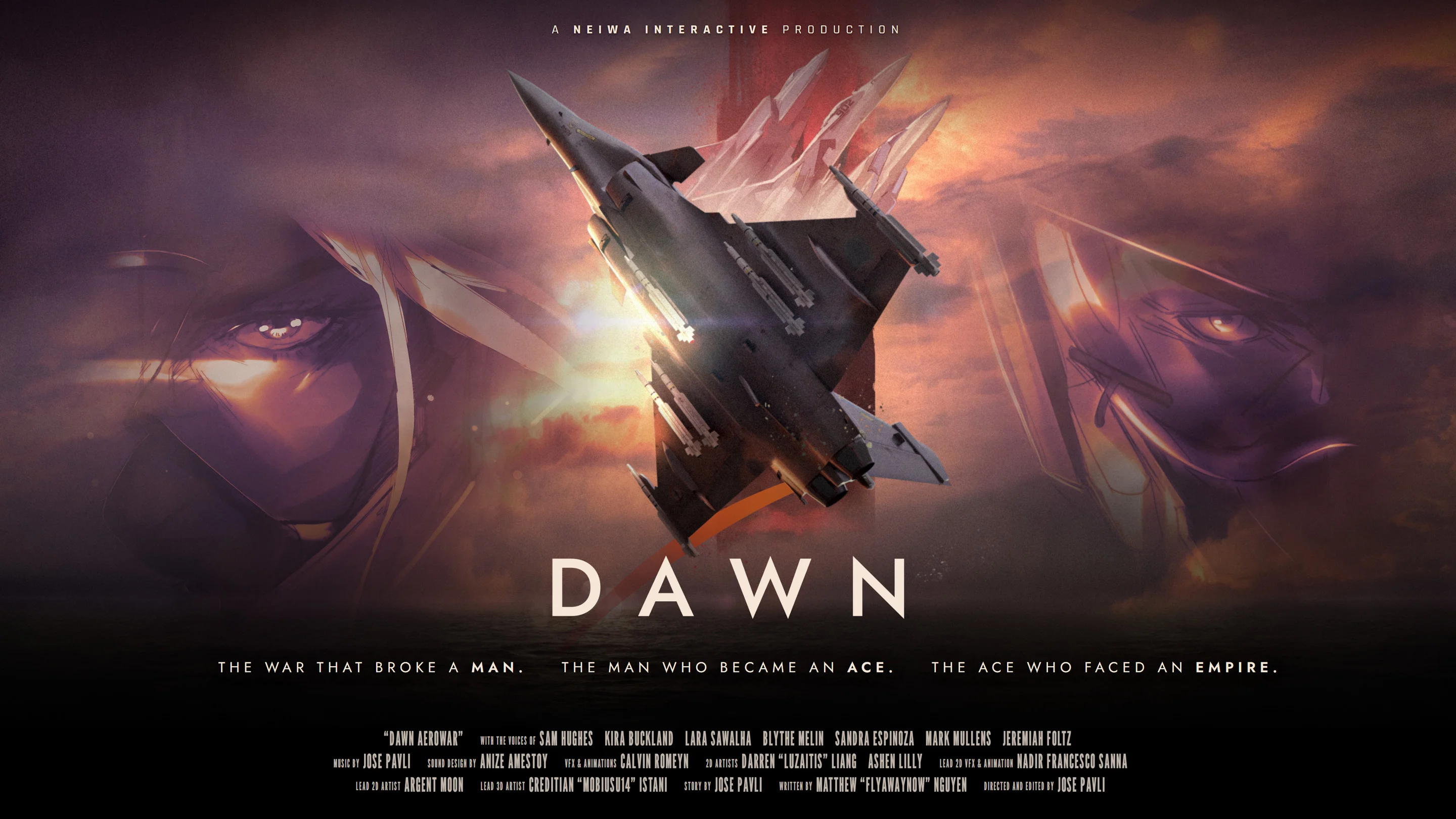
- Dawn Aerowar beginner guide: Treat the experience as an interactive animated war story, not a traditional flight simulator.
- Story structure: Follow nearly two hours of content across 12 episodes and several major war zones.
- Viewing approach: Use Cinematic mode, episode selection, and the map interface to control your viewing route.
- Before release: The Windows Steam version is planned for November 10, 2026.
- Language support: Expect English voice acting with subtitles in English, French, Italian, German, and Spanish.
Understand the Dawn Aerowar Format
For a first-time viewer, the most important part of the Dawn Aerowar beginner guide is understanding what kind of experience this is. Dawn Aerowar is presented as an interactive animated war film, combining 3D aircraft animation, 2D artwork, voice acting, original music, and chapter-based navigation.
It is not structured around conventional flight controls, equipment progression, character levels, or a combat-focused gameplay loop. The interactive features are designed to help you choose how to watch and revisit the story. This makes the project closer to an animated feature with interactive access points than a standard flight game.
3D Aircraft Animation
Large-scale aerial scenes use three-dimensional aircraft, environments, and wartime action to create a cinematic sense of movement.
2D Character Art
Hand-drawn character presentation adds contrast to the 3D aircraft sequences and gives the pilots a distinct visual identity.
Voice-Acted Story
English voice performances support the characters, radio exchanges, and dramatic progression throughout the animated narrative.
Interactive Viewing
Cinematic mode, episode selection, and map navigation provide ways to explore the feature beyond a single linear viewing session.
Start with Cinematic mode and watch the opening chapters in order. This preserves the intended rhythm before you begin revisiting specific episodes through the map.
The story follows Zodiac 1 during a final mission near the end of a major conflict. The operation moves through the Northern Front, the Strait, the Aegis Sea, and the capital while connecting the personal stakes of its pilots to the wider war.
| Feature | What to Expect | Beginner Priority |
|---|---|---|
| Format | Interactive animated war story | High |
| Runtime | Nearly two hours | High |
| Structure | 12 episodes | High |
| Visual style | 3D aerial scenes and 2D character art | Medium |
| Audio | English voice acting and original music | Medium |
| Progression | Chapter browsing rather than leveling | High |
For official project details, use the Dawn Aerowar official website and the official Steam page.
Follow the Story and Episode Route
Dawn Aerowar’s narrative is organized as a twelve-episode journey rather than a collection of unrelated missions. A beginner should focus on the broad route first: identify the central mission, follow its movement across the theaters of war, and only then return to individual chapters for closer examination.
The central viewpoint is Zodiac 1, whose final operation gives the story its structure. The route also introduces the Imperial Ace pilots Reaper, Freya, and Miracle, creating a clear opposing lineup around the aerial conflict.
| Story Stage | Main Focus | Viewing Advice |
|---|---|---|
| Final Mission | Zodiac 1 begins a decisive operation | Watch carefully for the mission premise |
| Northern Front | The war’s scale and military situation are established | Let the early episodes build context |
| Strait | The operation moves into a new battle zone | Track changes in route and opposition |
| Aegis Sea | The mission expands across a major maritime theater | Pay attention to aerial staging |
| Capital | The route approaches its final stage | Avoid skipping connective chapters |
Do not jump directly to the final episode if you want the strongest narrative buildup. The route through the Northern Front, Strait, and Aegis Sea establishes the meaning of the final mission.
Use the following order when planning a first viewing:
Begin with the Opening Episode
Start at the first available chapter instead of selecting a late mission from the map. The opening establishes the tone, conflict, and role of Zodiac 1.
Follow the Northern Front
Continue through the early war setting and note how the mission develops. This section provides the foundation for the later movement toward the Strait.
Continue Through the Strait and Aegis Sea
Treat these areas as connected stages of the operation. Watching them in sequence makes the route easier to understand and keeps the aerial conflict coherent.
Reach the Capital Before Revisiting Chapters
Finish the main route first, then use the map to revisit important episodes, pilot appearances, or scenes that deserve closer attention.
The episode structure is useful for both new viewers and returning fans. A first viewing benefits from chronological order, while later sessions can use the map to focus on specific locations, characters, or visual sequences.
| Route Area | Narrative Role | Recommended Session |
|---|---|---|
| Northern Front | Establishes the conflict | Opening session |
| Strait | Extends the operation | Continue in order |
| Aegis Sea | Broadens the war setting | Mid-story viewing |
| Capital | Brings the mission toward its final stage | Complete the route |
| Episode map | Supports revisiting chapters | Follow-up sessions |
Use Interactive Viewing Features
The interactive portion of Dawn Aerowar is primarily about navigation and presentation. Instead of expecting a conventional aircraft loadout or skill tree, use the available functions to decide how you want to experience the animated story.
The basic loop is simple: choose a viewing mode, select an episode, use the map when needed, and revisit scenes after completing the main route. This makes the experience approachable for viewers who want a film-like session as well as those who prefer chapter-by-chapter exploration.
Choose Cinematic mode for your first complete watch, then use episode and map selection for review sessions. This separates story discovery from chapter exploration.
| Interactive Feature | Purpose | Best Use |
|---|---|---|
| Cinematic mode | Presents the story as a guided animated experience | First complete viewing |
| Episode selection | Opens a specific chapter | Reviewing a known story point |
| Map interface | Organizes chapters by the story route | Choosing locations or stages |
| Scene revisiting | Allows another look at selected content | Studying pilots, visuals, or pacing |
Follow this process whenever you begin a new session:
Choose Your Viewing Style
Select Cinematic mode when you want a continuous, film-like presentation. This is the strongest starting point for understanding the overall story.
Select an Episode
Choose the opening episode for a first run or a specific chapter for a focused revisit. Keep chronological order for your initial session.
Use the Map as a Navigation Tool
Open the map when you want to understand the route between the Northern Front, Strait, Aegis Sea, and capital.
Rewatch Key Chapters
Return to selected chapters after finishing the story. Use this stage to compare character appearances, locations, and changes in the mission.
A useful beginner habit is to separate watching from reviewing. During the first session, avoid stopping frequently to inspect every chapter. During the second session, the map becomes more valuable because you already understand the broad route.
The official Chinese-language page is also available if you want to compare localized project information.
Learn the Main Pilots and Factions
The main character group centers on Zodiac 1 and three Imperial Ace pilots. You do not need to memorize every name before starting, but recognizing the opposing pilot lineup makes the story easier to follow.
Zodiac 1 is tied to the central mission and functions as the narrative anchor. Reaper, Freya, and Miracle represent the Imperial Ace presence connected to the opposing side of the aerial conflict.
Zodiac 1
The central pilot and mission unit. Zodiac 1’s final operation provides the main narrative viewpoint.
Reaper
An Imperial Ace pilot positioned within the opposing lineup surrounding Zodiac 1’s mission.
Freya
One of the three Imperial Aces connected to the wider aerial conflict.
Miracle
An Imperial Ace whose presence contributes to the opposing pilot group encountered during the story.
Keep a simple note of each pilot’s name, title, and faction during your first viewing. This is more useful than trying to memorize detailed background information before the story introduces it.
| Character | Role | Faction or Position | Beginner Focus |
|---|---|---|---|
| Zodiac 1 | Central pilot and mission unit | Protagonist side | Follow the final mission |
| Reaper | Imperial Ace pilot | Empire | Recognize the opposing ace lineup |
| Freya | Imperial Ace pilot | Empire | Track her connection to the conflict |
| Miracle | Imperial Ace pilot | Empire | Note her place among the Imperial Aces |
The war setting includes the Free Nations and the Saal'Runa Empire, with the larger conflict providing the political and military background for the mission. For a first viewing, focus on the immediate mission and pilot relationships before studying broader lore.
Dawn Aerowar also emphasizes its audio identity through voice performances and an original soundtrack. The official project information lists approximately 90 minutes of music across 34 tracks, giving the feature a substantial musical component alongside its animated visuals.
Prepare for the 2026 Release
As of October 26, 2026, Dawn Aerowar is planned for release on November 10, 2026, through Steam for Windows. The date is a planned release target, so check the official website and Steam listing for any future updates.
The project is designed for PC viewing and supports keyboard-and-mouse navigation as well as gamepad input. These controls relate to browsing and interacting with the presentation rather than operating a traditional flight combat system.
| Category | Current Information |
|---|---|
| Planned release date | November 10, 2026 |
| Platform | Windows PC |
| Storefront | Steam |
| Voice language | English |
| Subtitle languages | English, French, Italian, German, Spanish |
| Controls | Keyboard and mouse, plus gamepad support |
| Content length | Nearly two hours |
| Episode count | 12 |
First Session Preparation:
- Confirm the Windows Steam release information before starting
- Choose Cinematic mode for the initial viewing
- Begin with the first episode and follow the route in order
- Keep track of Zodiac 1, Reaper, Freya, and Miracle
- Use the map for chapter revisits after completing the story
Use this preparation checklist to avoid approaching the project with the wrong expectations. Dawn Aerowar’s appeal comes from its combination of animation, music, voice acting, war storytelling, and interactive access to episodes.
Set aside a continuous viewing session for the first run. With nearly two hours of planned content, uninterrupted viewing can make the film-like structure easier to appreciate.
Q: What is Dawn Aerowar?
Dawn Aerowar is an interactive animated war story that combines 3D aircraft animation, 2D character art, English voice acting, original music, and chapter-based viewing features.
Q: Is Dawn Aerowar a traditional flight simulator?
No. Its interactive elements focus on Cinematic mode, episode selection, map navigation, and scene revisiting rather than flight combat, leveling, equipment, or character progression.
Q: How long is the Dawn Aerowar story?
The planned presentation contains nearly two hours of content divided into 12 episodes.
Q: Which languages are supported?
The project features English voice acting and subtitles in English, French, Italian, German, and Spanish.