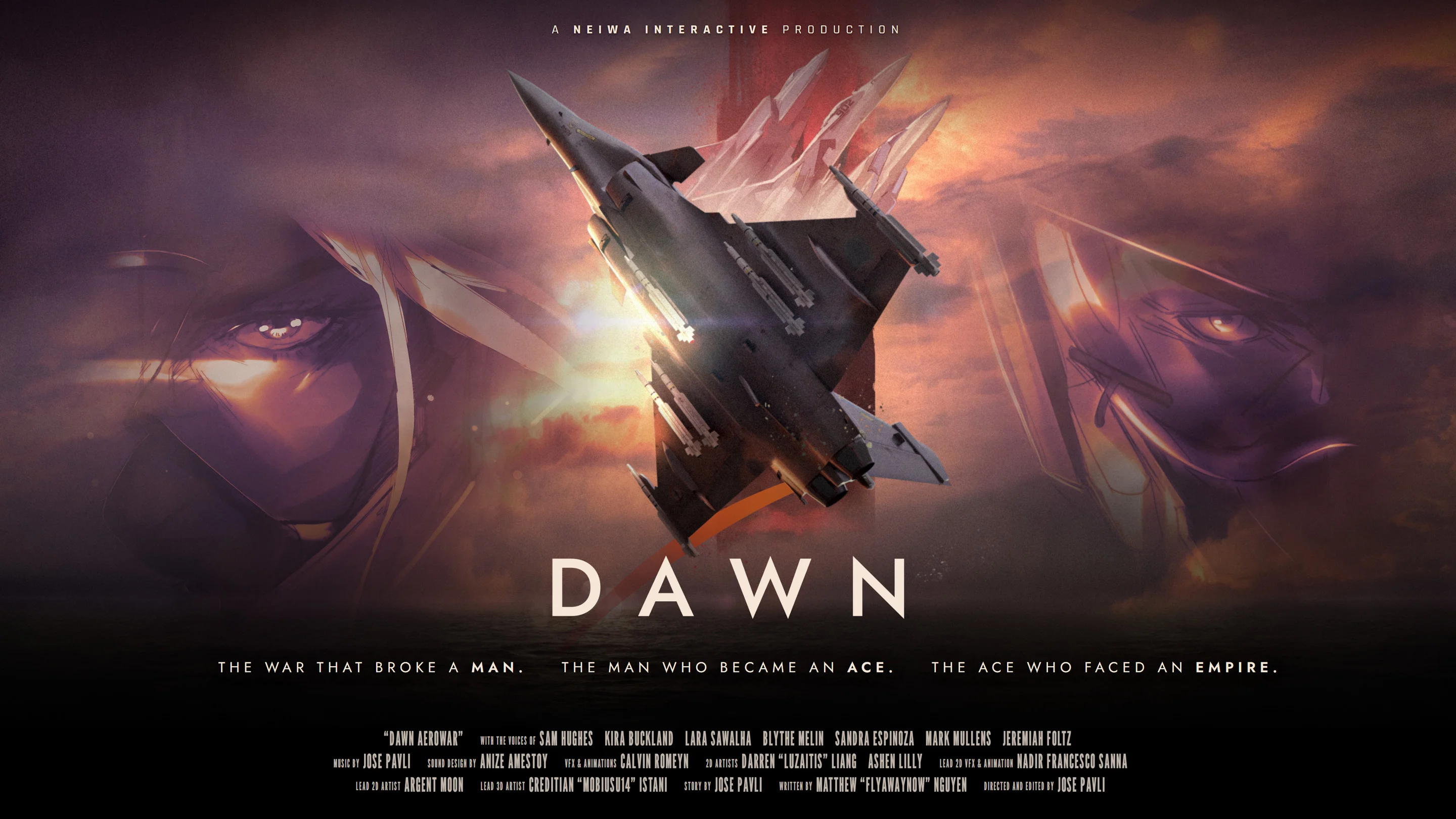
- Dawn Aerowar walkthrough: Follow Zodiac 1 from the Northern Front through the Strait, Aegis Sea, and capital.
- Format: Treat the experience as an interactive animated war story, not a conventional flight simulator.
- Progression: Use Cinematic mode, episode selection, and the map to manage your viewing route.
- Story length: The planned release includes 12 episodes and nearly two hours of animated content.
- Best approach: Watch in story order first, then revisit selected chapters for characters, visuals, and audio details.
Dawn Aerowar Walkthrough Overview
Dawn Aerowar walkthrough content is best understood as a guided viewing route through an interactive animated war story. The project combines 3D aircraft animation, 2D character artwork, voice acting, radio transmissions, and cinematic presentation. Its interaction focuses on choosing viewing modes, selecting episodes, and navigating chapters rather than managing combat, equipment, levels, or traditional flight controls.
The central story follows Zodiac 1 during a decisive final mission. The route moves across several wartime theaters: the Northern Front, the Strait, the Aegis Sea, and the capital. These locations provide a practical order for understanding the narrative without treating every section like a separate gameplay mission.
Recommended route:
- Begin with the opening presentation and establish the wartime situation.
- Follow Zodiac 1 from the Northern Front.
- Continue through the Strait and toward the Aegis Sea.
- Track the mission as it advances toward the capital.
- Revisit episodes after the first viewing to study characters, ace pilots, and visual details.
| Story Route | Main Focus | Recommended Action |
|---|---|---|
| Northern Front | Mission setup and aerial conflict | Watch in order |
| Strait | Expanding operation and rising pressure | Avoid skipping early context |
| Aegis Sea | Broader theater of war | Track radio and mission developments |
| Capital | Final stage of the operation | Save for the end of the first viewing |
| Episode map | Chapter navigation | Use for rewatching and selective review |
The map is most useful after the first complete viewing. Start with the chronological route, then use chapter selection to revisit specific scenes without disrupting the main story.
How to Follow the Interactive Viewing Route
The interactive structure is designed to make a film-length story easier to explore. Instead of expecting players to build a loadout or win aerial battles, Dawn Aerowar organizes its content around Cinematic mode, episodes, and a map-based chapter interface.
Choose the Viewing Mode
Select Cinematic mode when you want the most guided presentation. This option emphasizes atmosphere, animated scenes, voice performances, and film-like pacing. It is the recommended starting point for new viewers.
Start with the First Available Episode
Begin with the opening episode rather than jumping directly to a late mission. The story depends on its progression from the Northern Front toward the capital, so early context helps clarify the operation and its stakes.
Follow the Map Route
Use the map to identify the next available chapter or location. Treat the map as a narrative route through the war rather than a free-roaming flight map. The important goal is to preserve the intended sequence.
Track the Mission and Pilot Roles
Pay attention to Zodiac 1, the mission objective, radio exchanges, and the Imperial ace pilots Reaper, Freya, and Miracle. These elements connect the action across different episodes.
Revisit Selected Chapters
After finishing the main route, return to earlier episodes to review cockpit shots, 2D character scenes, aerial formations, and important dialogue. Chapter selection makes this second pass more efficient.
The planned structure contains 12 episodes with a total runtime of nearly two hours. Because the available information presents the story as a chapter-based animated feature, the most reliable walkthrough method is to preserve the episode order and use the map for navigation rather than searching for conventional mission rewards.
| Viewing Feature | Purpose | Best Use |
|---|---|---|
| Cinematic mode | Guided animated presentation | First story playthrough |
| Episode selection | Direct access to story chapters | Rewatching known sections |
| Map interface | Chapter and location navigation | Planning a route |
| Voice acting | Character and narrative delivery | Following dialogue and radio scenes |
| Chapter replay | Focused review of scenes | Lore and visual analysis |
Do not assume that interactive navigation creates a branching campaign. The available project information emphasizes chapter selection and viewing control, so follow the displayed story order unless the interface clearly provides another sequence.
Characters and Factions to Track
A successful story walkthrough becomes easier when the main pilot roles are clear. Zodiac 1 is the central pilot and mission unit, while Reaper, Freya, and Miracle are presented as Imperial ace pilots. Their opposing positions form the primary character framework for the aerial conflict.
The story also places the mission within a wider war between the Free Nations and the Saal'Runa Empire. For a first viewing, focus on how each character relates to Zodiac 1 and how the mission changes as it crosses different theaters.
Zodiac 1
Role: Central pilot and mission unit.
Focus: Follow the final mission, route changes, and narrative perspective.
Reaper
Role: Imperial ace pilot.
Focus: Watch for the character's position within the opposing pilot lineup.
Freya
Role: Imperial ace pilot.
Focus: Track connections to the Empire and the wider aerial conflict.
Miracle
Role: Imperial ace pilot.
Focus: Note how the character contributes to the opposing ace group.
| Character | Side or Role | Walkthrough Focus |
|---|---|---|
| Zodiac 1 | Central pilot and mission unit | Main route and final operation |
| Reaper | Imperial ace pilot | Opposition to Zodiac 1 |
| Freya | Imperial ace pilot | Imperial ace group and conflict |
| Miracle | Imperial ace pilot | Aerial opposition and character lineup |
| Saal'Runa Empire | Major opposing power | War context and military pressure |
For lore-focused replays, separate character information from world-building information. Zodiac 1 and the Imperial aces belong in a character reference, while the Free Nations, Saal'Runa Empire, war period, and regional theaters belong in a broader lore guide. This separation keeps the walkthrough readable and prevents the route from becoming an unfocused encyclopedia.
Keep a short note for each pilot while watching. Record the character’s role, faction, and relationship to the mission instead of trying to memorize every name during the first viewing.
Visual, Audio, and Story Details
Dawn Aerowar uses a mixed visual language. Aircraft, aerial movement, and large-scale battle scenes rely on 3D animation, while character presentation uses 2D hand-drawn artwork. Cockpit scenes add a closer pilot perspective, and the cinematic editing helps connect these different formats into one animated war narrative.
The soundtrack is also a major part of the intended experience. Official project information describes an original score of approximately 90 minutes across 34 tracks, with orchestral and choral elements supporting the wartime atmosphere. English voice acting is paired with subtitles in English, French, Italian, German, and Spanish.
| Detail | Confirmed Information | Walkthrough Value |
|---|---|---|
| Runtime | Nearly 2 hours | Plan one uninterrupted first viewing |
| Episodes | 12 | Use episode order for the main route |
| Voice language | English | Follow performances and radio dialogue |
| Subtitle languages | English, French, Italian, German, Spanish | Choose the clearest reading option |
| Soundtrack | About 90 minutes, 34 tracks | Revisit scenes for music and atmosphere |
| Visual formats | 3D animation and 2D artwork | Compare aircraft and character presentation |
Use the following method when reviewing a chapter:
- Watch the aerial composition first without pausing.
- Revisit cockpit scenes to study instruments, framing, and pilot perspective.
- Compare 3D aircraft movement with 2D character presentation.
- Listen for radio transmissions that clarify mission context.
- Note how music changes between action, travel, and character-focused scenes.
The official Dawn Aerowar website provides the primary project overview, while the official Chinese page offers an additional language option for project information. Subtitle availability should still be checked against the current release presentation when the title launches.
For a second viewing, choose one focus per pass: story route, character dialogue, visual composition, or soundtrack. A focused replay reveals more than repeatedly restarting the entire feature.
Release, Platform, and First-Viewing Checklist
Dawn Aerowar is planned for release on November 10, 2026, through Steam for Windows. The project supports keyboard and mouse navigation as well as gamepad input, with interaction centered on browsing and watching the animated content.
The planned release information may change before launch, so use the official Steam page for the latest availability details. The official Dawn Aerowar website remains the best place to check project announcements, presentation updates, and links to official channels.
| Category | Current Information |
|---|---|
| Planned release date | November 10, 2026 |
| Platform | Windows |
| Storefront | Steam |
| Input | Keyboard, mouse, and gamepad support |
| Primary audio | English voice acting |
| Subtitles | English, French, Italian, German, Spanish |
| Format | Interactive animated war story |
First Viewing Checklist:
- Choose Cinematic mode for the opening route
- Start with the first available episode
- Follow the map from the Northern Front toward the capital
- Track Zodiac 1 and the three Imperial ace pilots
- Use chapter replay after completing the first viewing
Before starting, prepare a viewing setup that supports the project’s presentation:
- Select subtitles that are easiest for you to read.
- Use headphones if you want to focus on voice acting, radio transmissions, and music.
- Keep the map available for chapter navigation.
- Avoid skipping episodes during the initial route.
- Use replay tools only after establishing the main story order.
The project does not require a traditional build guide, farming route, or combat tier list. Search terms such as “gameplay” or “flight game” may describe how users discover the title, but the most accurate walkthrough language is interactive viewing, episode route, story progression, and chapter navigation.
Check the official Steam listing before November 10, 2026, for the latest release status, supported features, and platform details. Treat the date as planned until the publisher confirms launch availability.
Dawn Aerowar Walkthrough FAQ
Q: Is Dawn Aerowar a traditional flight simulator?
No. Dawn Aerowar is presented as an interactive animated war story that combines 3D aircraft animation, 2D artwork, voice acting, music, and chapter navigation. Its interactive elements focus on choosing viewing modes, episodes, and map locations rather than combat simulation or aircraft progression.
Q: What is the recommended Dawn Aerowar walkthrough order?
Begin with the first available episode, follow the route from the Northern Front through the Strait and Aegis Sea, and continue toward the capital. After the first viewing, use the map and chapter selection tools to revisit individual sections.
Q: How many episodes does Dawn Aerowar include?
The planned project structure includes 12 episodes with nearly two hours of total animated content. Individual chapter titles and interface details should be confirmed through the official release presentation.
Q: Which characters should I track during the story?
Focus on Zodiac 1 as the central pilot and mission unit, then track the Imperial ace pilots Reaper, Freya, and Miracle. Their roles help establish the opposing pilot lineup and the aerial conflict surrounding the final mission.
The clearest way to approach the title is as a chapter-based animated feature. Follow the story route first, then use interactive navigation for focused rewatching and lore study.